First off, we wanted to say that overall the shipping integration update is fantastic, it is the most significant update for us so far!
I wanted to give some feedback on it after using it for a few weeks, most of it is minor and I think relatively easy to come up with a quick solutions.
Rules – is it possible to have some form of rules to auto select the correct courier? The rules can be based on simple data that is already available – weight, product container, product type, SKU etc.
a. Example 1 - if order contains any line with product container = *L KeyKeg
Then set courier = “DHL”
End if
(used the *wildcard so it can be any volume but if this cant be done we can just duplicate the rule for all sizes)
b. Example 2 – if total order weight => 250
Then set courier = “Palletways”
End if
Auto set number of consignment boxes – in the past we have sort of fudged this with some rules, but I think a better way is to set available box sizes/weights and assign what combinations of product types can go in what box. For example.
• Box A can take single cans – max 12kg per box
• Box B can take 12packs OR 24packs – max 24kg per box
• Box C can take 30L Keykegs – max 30kg per box
• Box D can only 30L steel kegs – max 40kg per box
For example – if an order is
• 2x12pack (6kg)
• 1x24pack (12kg)
• 1x30L Keykeg (30kg)
The system would set 2 boxes on the consignment (1xBox B and 1xBox C) to fulfil the order.
Then orders can be set to auto select the correct and minimum number of boxes on the consignment. I am open to other suggestions on how to do this if you have them.
Filters on the delivery page, e.g.
a. Paid/unpaid status
b. Order status (confirmed, invoiced etc.)
c. Delivery status
Print individual order packing lists with labels – On the last shipping integration we used, we were able to create simple packing list that came out with the label all in one go. It is possible to have an option to print pick lists after each courier label set? I have attached a picture of what we used to get, just basic info is enough and readable on a 6x4 label.
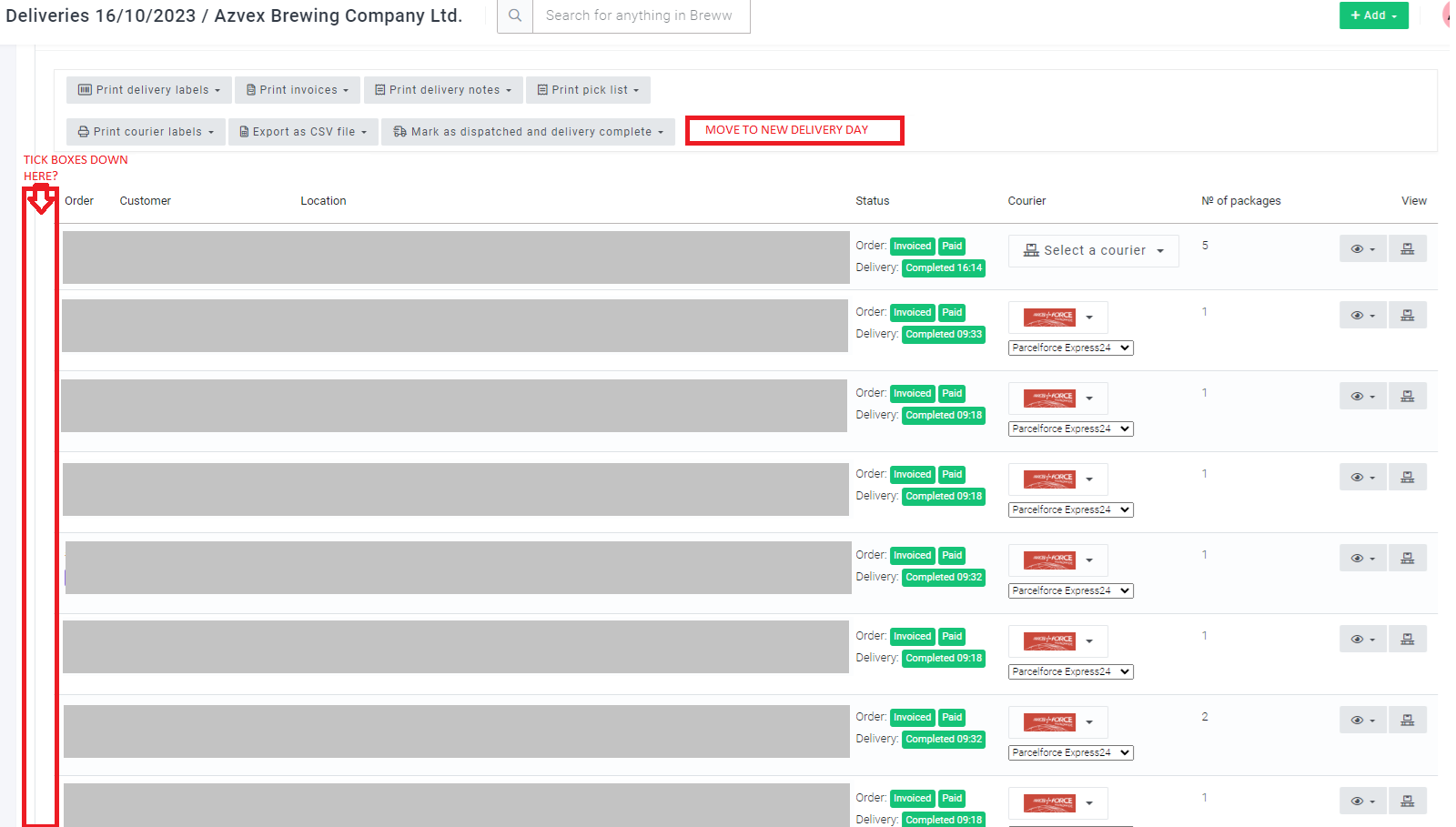
The ability to bulk move deliveries to another day – If there was a way to all the orders that are on the wrong date to the correct one in a single step that would be great. Maybe a tick box down the left-hand side of all the delivery orders then a button to re-assign the selected ones to another chosen day?
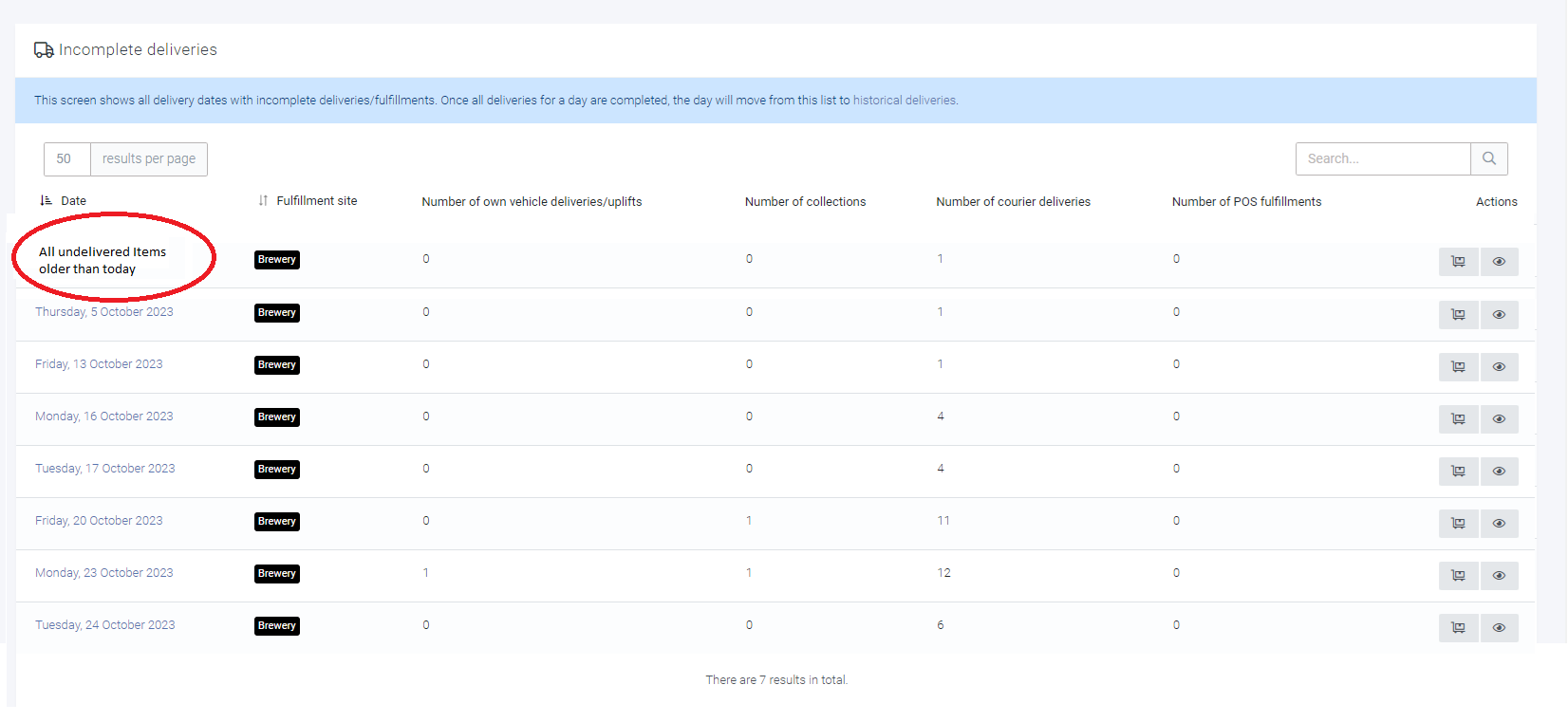
Related to the above, it would be great if there was a master “historic undelivered” option where we can see all the orders that have not been completed on a single page other than spread across lots of days. This will help with above step as we can move more incorrect dated deliveries in one go.
Have the ability to edit the data in the following screenshot on the delivery page other than having to go back to the order page to do it. E.g. if the delivery name is too many characters or the delivery date is wrong then there is an error when trying to print the labels.
Access to additional settings for couriers – I understand this is in beta so might be in progress but there are some other settings we have access to on other shipping integration platforms e.g. pickup ready time. Right now, it seems to be set an hour earlier than we used to have it, so our driver comes too early and we aren’t ready.
Hopefully this makes sense but if any of it doesn’t feel free to get in touch.
Thank you, Adam, for all the really useful feedback and kind comments. It’s great to hear that this feature has been helpful for you!
I’ve split your comment off to a feature request thread to ensure we don’t lose track of it as a comment on the help guide.
Rules - This is a great suggestion and something that we’ve been working on for a few weeks already. It’s quite close to being finished, so should be live before too long. We’ll follow up here when it’s ready.
Access to additional settings for couriers - This one is already in progress too We’ll follow up here to confirm when this is usable
Thanks for all the really useful feedback and suggestions; they are extremely helpful. Having lots of requests in one long thread is actually really hard for us to deal with, so this is why I’ve been splitting them all up for you (I appreciate this might have seemed odd). For the voting system, it’s important that people know what they are voting for and we know which feature they are trying to target with their vote. We also need to be able to “mark requests as complete” to ensure we can organise our development team effectively. I hope this makes sense, and thanks again for the valuable feedback.
@adam-henderson We’ve added the ability to specify values of your choice for most of the “optional fields” on each courier now. This should allow you to specify values such as the pickup-ready time for APC, DHL, etc.
Can you please edit the integration settings (where you set the courier account access details) and let me know if there are any extra fields that you need to be able to set that you’re unable to? But hopefully, we’ve got them all covered now
Is there a specific field for Parcelforce that you’re expecting to see? I’ve had a quick look at the Parcelforce documentation, and although there are some fields that we don’t let you set currently, I don’t think they’re things you’d need to set. It’s possible that there are other fields available that are not in the documentation that we have (this wouldn’t be the first time), so it would be helpful to know what you’d like to set. Cheers!
We’ve launched Delivery rules now, which allow you to have your deliveries automatically scheduled. We hope this is useful and please let us know if you have any feedback
There is a collection time option but not sure it actually does anything. Its not the end of the world, we just need to tell new drivers when we will be ready.



 We’ll follow up here to confirm when this is usable

