Would it be possible to add a function that allows us to fully complete all orders for the day from the deliveries page—similar to how we can currently allocate all stock in one go?
At the moment, completing each order individually can be quite time-consuming, so a bulk-complete option would really help streamline the process.
Please let me know if this could be added, or if you need any more information.
There are already buttons at the top to bulk complete groups of deliveries, such as all on a specific delivery run or all for a specific courier. Have you seen these buttons?
If so, how would you like your button(s) to differ from these?
Yes, we’ve requested this before using the tick boxes, but since that wasn’t an option, we thought a “Complete All” button for all of the day’s invoices might be a helpful alternative — it would save a lot of time. Going into each order individually to complete it is very time-consuming.
I’ve had a look through the system and can only find the option to auto-assign all items in bulk. Could you let me know if there’s a way to bulk complete multiple invoices, or where that option might be found?
Are your deliveries via your own vehicle or courier? The buttons for these vary in position, but there are already buttons to complete all deliveries via both options. They’re both available when viewing the list of these deliveries.
@hollie-noble please can you get back to me on the above?
I want to ensure you’ve found all the bulk-complete buttons before closing this (or find out why the existing buttons don’t cover what you need, should that be the case).
Sorry for the delay in getting back to you, Hollie. This slipped through the cracks on our side as it’s a support request, but posted as a feature request. I should really have moved it to the right category before so the correct team at Breww saw your reply and could have responded much more quickly than me. Sorry about this!
To answer your question:
Own-vehicle deliveries
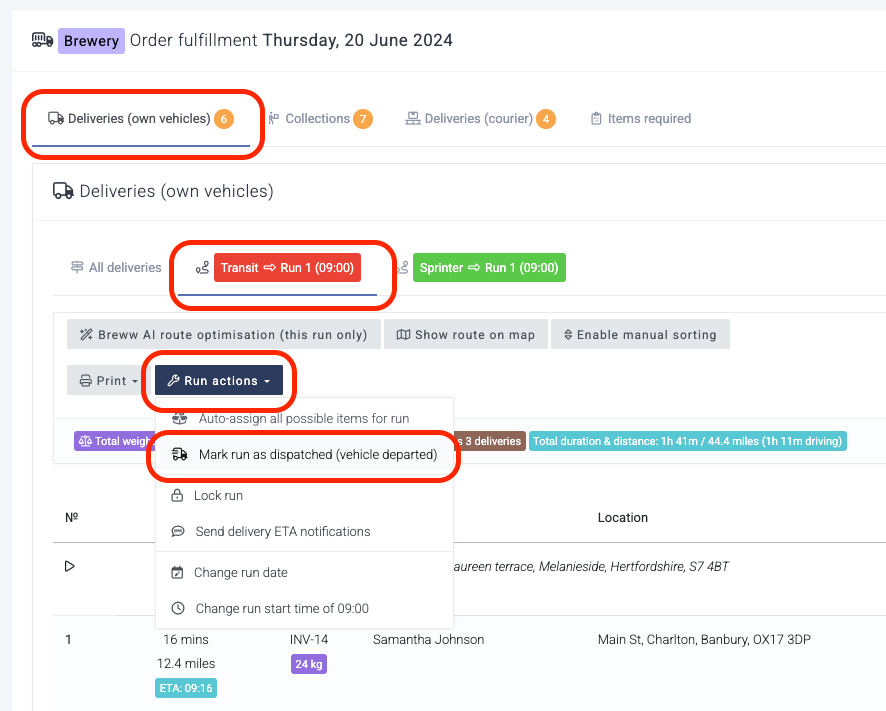
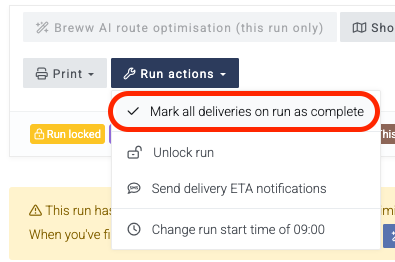
You need to go to the delivery run in question, then use the Run actions button. Please see the below screenshot.
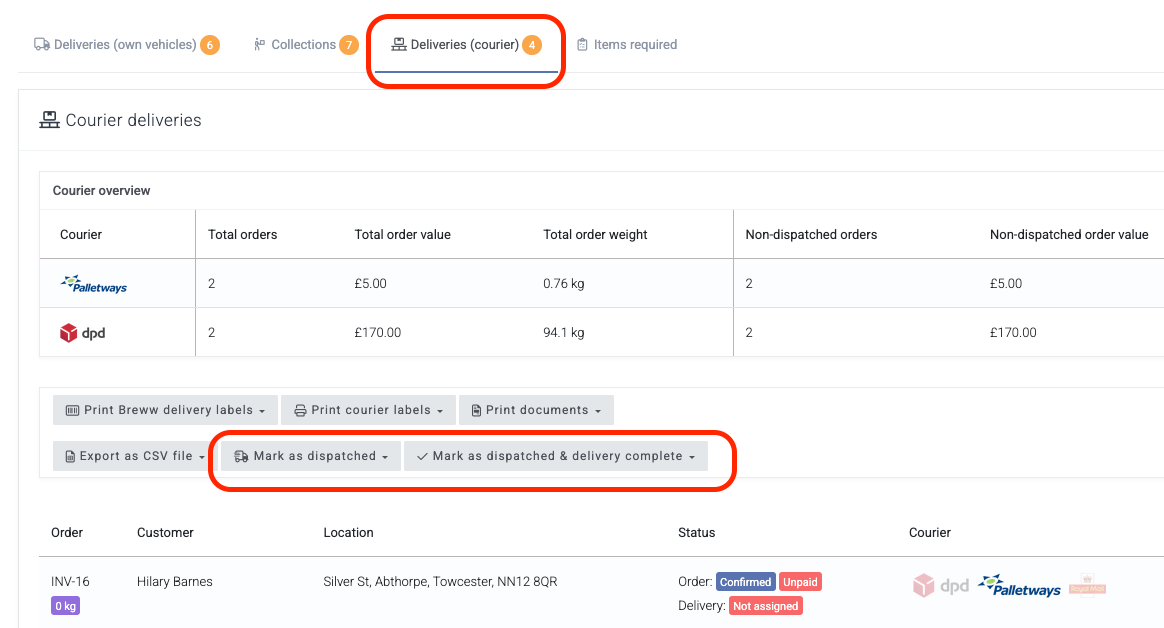
Above the list of deliveries are buttons that can be used to bulk dispatch or bulk complete all courier deliveries or all courier deliveries for a single courier, such as DPD or UPS, etc.
Ah ok, thanks Hollie. You can still assign deliveries to vehicles without using the route planning. But the route planning is an excellent feature so I’d highly recommend looking at why you can’t use it (our support team can help) as it’s highly beneficial (even with the “free” version that’s included in all price plans).