Hello,
We are quite frustrated by the deliveries page - we find it very difficult to navigate and use efficiently. Here is a suggestion for how this could be improved:
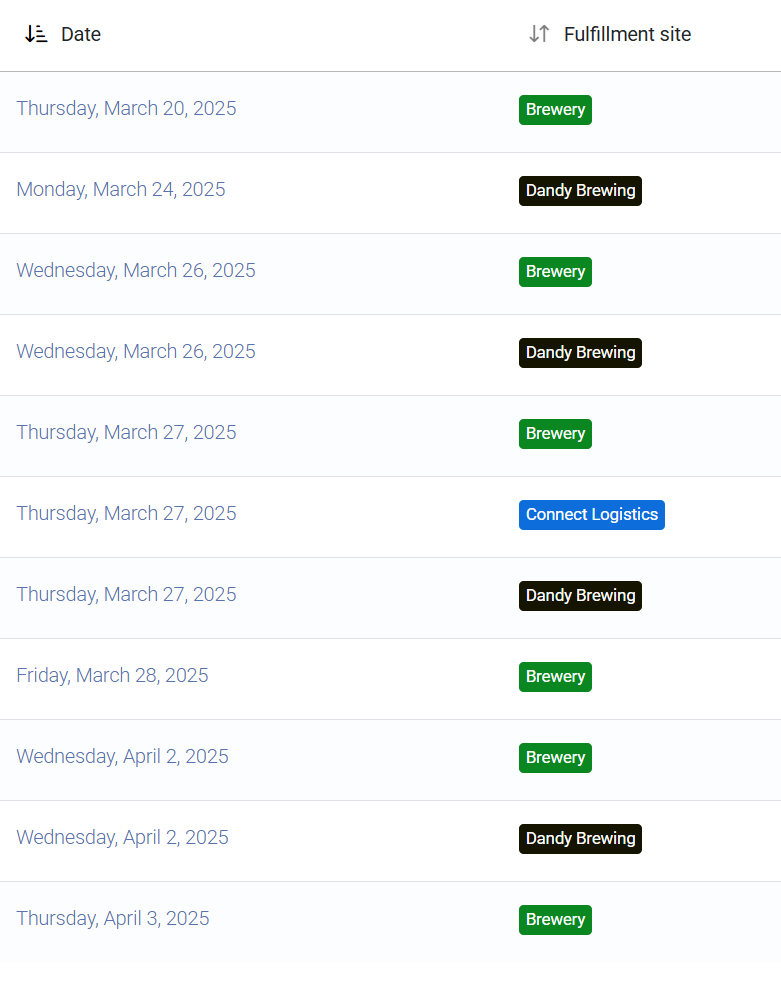
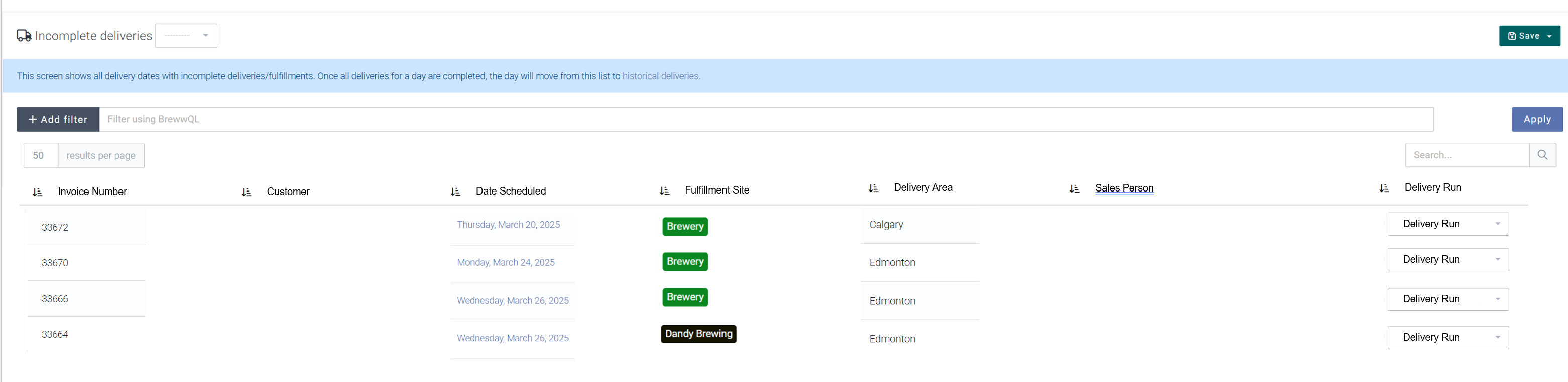
It would be much more user friendly if the user could see all outstanding orders for a specific delivery area, in one table. In this table, the user could select which delivery run each order goes on from a dropdown (i.e. "Delivery van #1, March 28, 2025, Run #1) Currently the user can only see a list of dates and fulfillment sites. It’s a lot of clicks and sometimes a lot of dead-ends to ensure we have all items for a delivery run picked and placed on a truck in Breww.
Here’s what our current delivery screen looks like:
Then a user can easily pick and choose orders for each delivery run, from a common screen.
There are probably other ways to do this also - it would be good to put some thought into this.
Thanks,
Dave
Are you using Delivery Areas to pre-categorise deliveries by area into the best day of the week to go to that area? This is how Breww is intended to work, hence how the functionality is laid out currently.
It’s intended to work like:
Use Delivery Areas to organise deliveries by date
On a date, optimise deliveries onto runs in one click with the route optimisation button.
But it sounds like you’re not doing step one. Is this just because you didn’t know this is how Breww is intended to work, or because that workflow doesn’t work for you? If so, why doesn’t it?
It all works great in theory, but in practice it’s really not working very well for us. We do use delivery areas to organize by date. This generally works ok for a lot of our orders. Problems arise for the following reasons:
Our schedule can be a bit chaotic sometimes, due to events and “extracurricular” activities (stops that we need to make that are not beer deliveries… very difficult to schedule into Breww, and we might not want to do that anyway). I’d imagine this is a common experience for many small breweries.
We deliver to Edmonton twice a week (an hour away) and there are numerous factors that go into which of these two days each specific delivery will be scheduled for (not just the location of the customer). This means that we have to click back and forth between the two delivery days to move things around appropriately.
If the rest of our system was dialed in perfectly, the issues with deliveries would be somewhat less. That might be a bit unrealistic though. One example is that whenever we have a keg tracking issue (which admittedly happens more than we’d like), we are unable to complete the delivery for that item, meaning the whole delivery day shows up on the “incomplete” list until we can correct the keg tracking issue.
Once a week we deliver to Calgary. It’s a bit of gymnastics logistically, because we first deliver a STO from our main site to our warehouse down there. Once the product arrives in Calgary, we split it three ways – some items stay at the warehouse, some go on each of two local delivery vans. This is all fine – we know how to work it properly in Breww. However, because of how the delivery page is laid out (by date instead of by order) it gets really confusing really fast, with all the dates and fulfillment sites etc.
Not sure if this explains it fully. I do recognize that if we were completely on top of things in the rest of the system, the delivery part would work better than it does. However, the ideal world is not always the real world. If it’s easier, I’m happy to talk through this with you on a call.
Thanks
Showing a list of outstanding deliveries is relatively simple to build, but you can already get this by filtering the main orders list (“Sales” in the main menu). The more complicated part of your request is selecting a delivery run on each row (Which existing runs should show? What about creating new runs? etc.).
Until we get to building something to help with this, I’d suggest filtering the Sales list would be a helpful starting point. This BrewwQL will get all orders that haven’t been delivered yet:
(deliverycollection = None or deliverycollection.completed = False) and fulfillment_required = True
This can be adjusted to also filter by delivery area with something like:
(deliverycollection = None or deliverycollection.completed = False) and fulfillment_required = True and customer.delivery_areas.name = "Calgary"
Hey Luke,
I have done it this way before, and yes, it is helpful to filter the sales list.
However it’s still a major pain to schedule runs that way. It takes a ton of clicking around.
I would suggest the answer to your question “Which existing runs should show?” is to have a dropdown list of all the uncompleted delivery runs, with each item in the dropdown being a date plus the vehicle plus a run number (for if there’s multiple runs in a day). You could use a date picker control for this too potentially.
In the dropdown, you could have “Add New Run” as one of the options. I know this adds complexity but it would be very helpful.
Dave