We self-distribute, so we frequently have to break down kegs from 1/2 bbls to 1/6 bbls. We look up the keg id, package from keg, then select the kegs from the dropdowns or type their names in. It’s a bit tedious and here are some things that would cleanup the workflow:
We should be able to use the scanner to select the tracked kegs we’re packaging into
We should only be able to select products that match the package type selected (1/6 bbl product into 1/6 bbl keg). In most cases, there will only be one option, so having this auto-populate would be ideal.
Barcode scanning kegs - this would be a great improvement!
Selecting only the right package types - you said “…that match the package type selected…” but there is no selection of the container type on a prior step to picking the product. Unless I’m missing something, there isn’t anything Breww can filter on here to reduce the product list size on the next step. Or are you suggesting there should be a container type selection on the first step so it can be used to filter the second step? Or am I misunderstanding something completely?
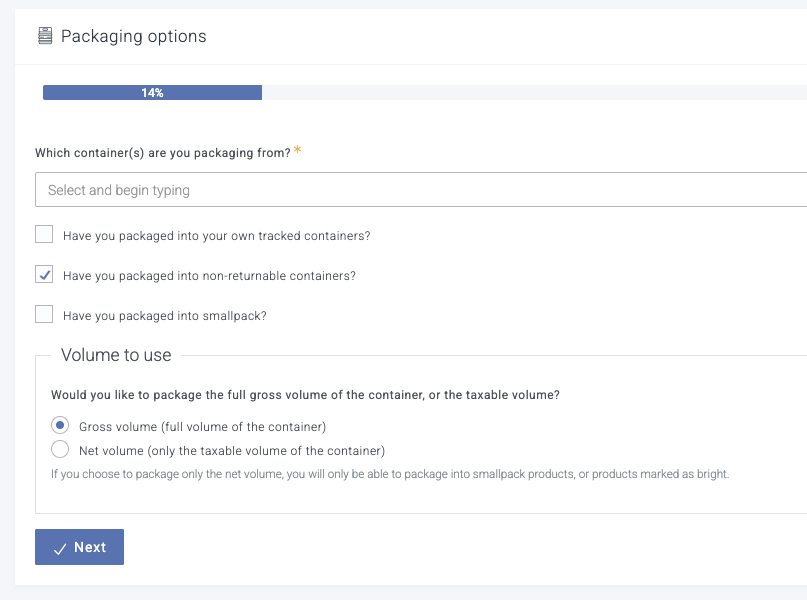
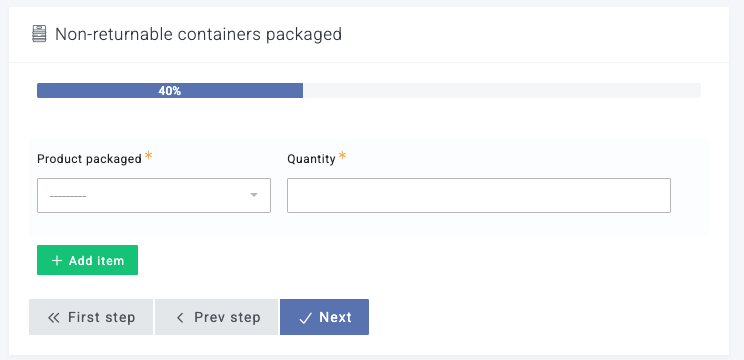
For context, step one and two look something like:
We’re doing tracked containers, so when we choose a container, we know what size container we’re packaging into. It seems like the list of products should then match that container size. So if I choose 1/6 bbl keg number 212, I should only be able to select the 1/6 bbl keg version of that beer as the product, not the 1/2 bbl version. In most cases, that means there is only 1 possible product, unless there is a derived-at-packaging product.
Thanks Evan. You might know what you are planning to package into, but Breww doesn’t as you don’t have to package from a container into another of the same size.
If you are packaging from a 1/2 bbl (for example), you could be packaging into multiples of other keg sizes. You could even be packaging from more than one 1/2 bbl into larger containers.
We would be able to calculate the total volume from the first step (i.e. combined volume of all selected containers) and only show products with the same volume or smaller on the next step. This would mean that if you picked a single 1/6 bbl, then on the second step we could filter out larger sizes, like 1/2 bbl and 1/4 bbl as you wouldn’t have the volume to package from them - does this sound like a good solution to you?
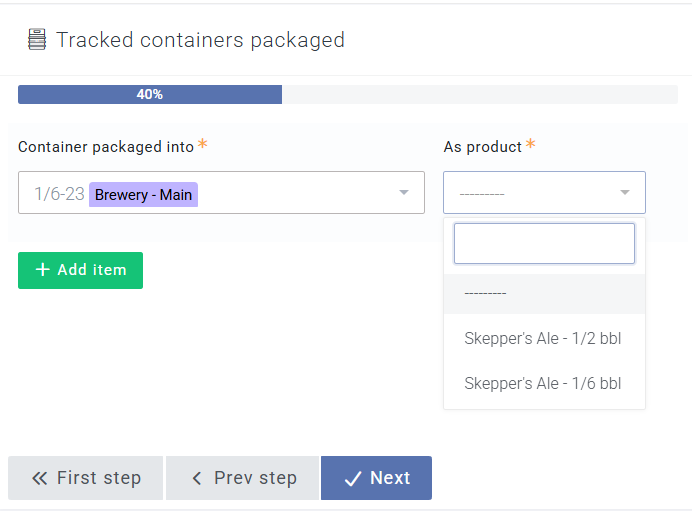
Maybe this screenshot will help. What I’m trying to say is that once you select the container to package into (the left side), you select the product (on the right side) which matches the drink in the source keg plus is derived drinks, but doesn’t automatically filter on the container type.
In this example, I’m trying to re-package a 1/2 bbl keg of Skepper’s Ale into 1/6 bbls. I selected a 1/6 bbl keg to package into, and it gives me the 1/2 bbl and 1/ bbl options as the “product” to call it. This doesn’t make sense, because you can’t have a 1/2 bbl product in a 1/6 bbl keg.
I don’t know if this is true, but it seems like we should be able to filter the products list based on the selected container’s type. In most situations, there is only one possible product (drink + container = product), so if we could auto-populate the product field in those cases, it would save us 2 clicks for each container packaged into.
Good news, this is now live in Breww You can scan the tracked kegs you’re packaging into (and the ones you’re packaging from), and each scanned container only offers the products that match its container type, picked for you when there’s only one.
 You can scan the tracked kegs you’re packaging into (and the ones you’re packaging from), and each scanned container only offers the products that match its container type, picked for you when there’s only one.
 Looks great, thanks!