Stock Transfer Orders without Raising Invoices

Hi there,

Whilst the new “Stock Transfer Orders” feature is a great step forward, it would be much improved with an option to not have invoices raised in the process. For example, when moving consignment stock to a third party site ahead of invoicing to a customer at a later date, having an initial invoice raised to reflect the transfer - even at zero value - is unnecessary, and causes issues with reporting. When these extraneous invoices are included in reports, with associated product quantities and volumes (e.g. in the “All Sales” report), they badly skew the data and any analysis conducted related to product/volume sales (e.g. when calculating average selling prices.)

Until such a tweak can be made, we regrettably won’t be able to make use of the feature at all due to this potential impact on reporting, and will have to continue to manage stock movements individually via the “Locations” tab on product pages, which is far from ideal.

Cheers,
Greg

1 Like

Thanks, Greg, we totally understand. There are situations where an invoice is required, so we’re happy with the basic premise of how this feature was implemented, but allowing for an invoice to not be raised would be a great improvement.

If anyone else would find this useful, please give this thread a vote :+1:

Yeah i would also find this useful. I have been pushing for this warehouse change for a while now so super happy to see it has been done but as with Greg, i wont be able to use it without the option to transfer between sites without it showing up as a sale.

1 Like

Also voted, we would like an option for moving consignment stock that shows on the deliveries system and doesn’t impact sales/invoicing etc. Something that could be scheduled in advance rather than the location movement.
Even if this new bulk stock transfer method didn’t raise an invoice would you then be able to invoice these products to the final consignment customer from another “customer” record?
Currently we have the final customer set for fulfilment only from the “consignment stock” site.
Cheers

1 Like

Also voted, stock transfers showing in total sales volume is really throwing out our totals when looking at the ‘All Sales’ report. Exporting, removing the stock transfers in Excel and then totalling the volume column gets us an accurate figure but would be great if this could be done easily in a couple of clicks on Breww.

2 Likes

Agreed, the requirement is an extra step that shouldn’t be required and it distorts reporting.

1 Like

Hi, just jumping on board here. Stock transfers are not “sales” for us and they also cause the problem of doubling sales of single products. For example, if I transfer a keg of IPA to another warehouse and then sell that keg to a customer it is recorded in the sales reporting as 2 kegs sold. That’s a major problem for our reporting and forecasting. Is there a way to a at least exclude “sales” marked as “stock transfer” in the reporting?

1 Like

Good news, everyone; I’m delighted to confirm now that you can choose if you’d like stock transfer orders to raise invoices or not. Those that do not raise invoices will be excluded from sales reporting (edit: via pre-built reports). :tada:

You can specify on a per-customer basis if their stock transfer orders should raise invoices or not and override this on a per-order basis (if there’s an exception to the normal rule). If you’ve been using this feature up to now, I’d recommend checking that each customer with this enabled has the right option chosen. For more on this, please see the updated help guide:

https://community.breww.com/t/how-do-i-move-transfer-product-stock-and-stock-items-to-a-different-site-location/1789#p-4453-multiple-products-via-a-stock-transfer-order-3

If you have any old stock transfer orders on your account that were previously invoiced and you would like them to be switched to the new “Completed (no invoice)” status rather than “Invoiced” to remove them from sales figures, please raise a support ticket requesting this and we will be able to make this adjustment for you. In the ticket, please either give us a list of the invoice numbers to update or simply state that all need updating. Please bear in mind that this will result in historical reports on “sales” being adjusted, and any accounting platforms (e.g. Xero, Quickbooks, etc) will not have the invoice removed by this adjustment.

We hope this is helpful, and thank you, everyone, for voting for this, commenting and your patience while we completed the implementation.

2 Likes

This is great news, thanks for the update Luke.

Can I just check, is there any way to report on these stock transfers, or are they excluded from ALL reports?

Cheers,
Greg

1 Like

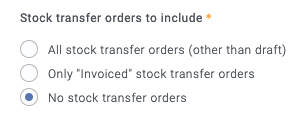
Thanks, Greg. The Sales revenue/liquid volume sold by beer report has an option to include them, but at this time, that’s the only report that does.

Screenshot 2024-10-21 at 12.58.12

It may be possible to add a similar option to some other report too, if that would be helpful?

OK good to know, thanks!

We would benefit from it being a toggleable option within the Raw Data Explorer, such that all custom reports could be tailored to include or exclude stock transfers as appropriate. E.g. we use a customised, saved version of the “Products sold (order lines)” report to analyse stock movement (usually sales) on a weekly basis, so would ideally retain visibility of stock transfers within that.

Apologies, Greg, I was a bit misleading before. Stock transfer orders are excluded from all pre-built reports (unless specifically asked about, such as in the Sales revenue/liquid volume sold by beer report).

They are included in the raw data explorer unless you filter them out using BrewwQL.

The Products sold (order lines) report has the default BrewwQL filter of:

invoice.order_status = "Invoiced"

And this will only include “Invoiced” orders. This will also include any invoiced stock transfer orders (STOs) but exclude STOs that are “Completed (no invoice)”. If you wanted both included, you could use:

invoice.order_status in ("Invoiced", "Completed (no invoice)")

If you wanted all invoiced orders other than STOs, you could filter these out specifically:

invoice.order_status = "Invoiced" and invoice.source != "Stock transfer"

For a more complex example (like the All stock transfer orders (other than draft) option on the Sales revenue/liquid volume sold by beer report), you could use the following. This would include all confirmed or invoiced normal orders, plus all invoiced/completed STOs (but not confirmed STOs):

(invoice.source = "Stock transfer" and invoice.order_status in ("Invoiced", "Completed (no invoice)")) or (invoice.source != "Stock transfer" and invoice.order_status in ("Invoiced", "Confirmed"))

Note the brackets that make sure the filtering logic is applied correctly. The != comparison means not equal to. The same BrewwQL as above, could be written with some newlines to make it easier to read/understand:

(invoice.source = "Stock transfer" and invoice.order_status in ("Invoiced", "Completed (no invoice)"))
or
(invoice.source != "Stock transfer" and invoice.order_status in ("Invoiced", "Confirmed"))

I hope this makes sense and the examples are useful, but please do let us know if there are any further questions on this.

1 Like

Thanks Luke, those examples are very helpful. We should be able to do everything we need, I believe!

1 Like

Luke,

Many thanks for this update - its exactly what we have been after.

The only thing I can see thats an issue, and it may be that Im just missing something, is that there doesn’t seem to be a way to hide the stock at off site warehouses for the product available report or form the product list.

So for example, I may send two pallets of bottles - 280 cases - out on consignment to a depot. I then only have 40 cases left in the brewery.

If im then looking through products or availability the stock figure shows 320 cases - which is a fact, however in reality I can only sell 40 cases to other people.

This has been addressed when putting orders on, as the stock on the drop down when entering orders only shows what’s available to that specific customer. However if Im scanning through the product list working out what I need to brew next, then I now need to go into each individual product to see what the actual stock is minus stock out on consignment.

As it stands I think this risks people making mistakes and thinking they have more “Free stock” then they actually do

Thanks Ben, it’s great to hear that this has helped.

This is a great point, but not part of this particular feature request. There are already feature requests for these ideas:

If you can vote for those threads, that will help us to prioritise them correctly. Cheers.

A post was split to a new topic: Site used for stock requirements on orders imported from sales integrations