On the Products screen, it would be helpful for Breww to provide a dropdown filter that would allow us to show only inventory at the filtered sites. For example, if “Site A” were selected, the “Qty in stock” field would only show inventory at Site A. Any product that didn’t have inventory at Site A would be hidden. This is different than what can currently be done with BrewQL - which only filters the view, and never changes what shows in the “Qty in stock” field.
Further, it would be helpful if there were a button on the products screen that let the user simply export what is displayed on the screen directly to excel, rather than having to go into reports to do it, after reconstructing all the necessary filtering.
Have you seen the report at Reporting → Pre-build Production & inventory reports → Product stock availability breakdown by site? Does this cover what you need (and it can be exported)? Or would you still like a filter on the main products page? Cheers.
Hey Luke,
Yes, we have used this report a bit; however I feel that it has limitations, and don’t love the fact that it also requires the user to navigate away from the Products screen (where all the work is done) to view the needed data for whatever task they are working on.
Limitations of the “availability” report are that we can’t filter it (say, to hide zero or low-stock products), and we can’t limit it to a certain site (for example if we only want to see products that are in stock at our main brewery site).
We also have users that don’t need to use reporting for anything else, so the interface is a bit unfamiliar for them, compared to the normal Breww side-menu tabs - but that is a minor thing.
Exporting directly from the product screen is another feature that would be extremely helpful, and maybe this idea should be more generalized into a different Feature Request. Essentially, with a this change we would be able to use BrewQL to create the exact data view we like using the Product screen and then click a button, and voila, the exact columns and filtering shown on the screen get dumped into an Excel file. A lot of other software I’ve used has this ability. You’re almost there with the reporting module, but the missing piece is tying it into the screens where the actual work gets done. I guess it’s a bit of a general critique that reports and “work modules” are maybe a bit too separate in their own silos, when ideally they would be more integrated together within the general workflow. I used the Products page as an example but the same goes for other modules as well (customers, sales, production etc.).
Sorry, that’s a bit of a book, but hopefully explains what we’re after?
Thanks, Dave. Yes, that makes sense and the extra context is helpful. Certainly the concept for customisable columns on “list pages” and exporting lists is something we’ve discussed a number of times internally. Some list pages can be exported already and this is something that we’ll be expanding gradually over other list pages. Customisable columns would be great too; it’s a complex project, but I’m sure it will come one day.
We’ll keep this thread open to pick up votes on adding stock levels to the product page (with exporting). I can see how this would be useful
Hi - hopefully a simple addition to the Add Filter menu…
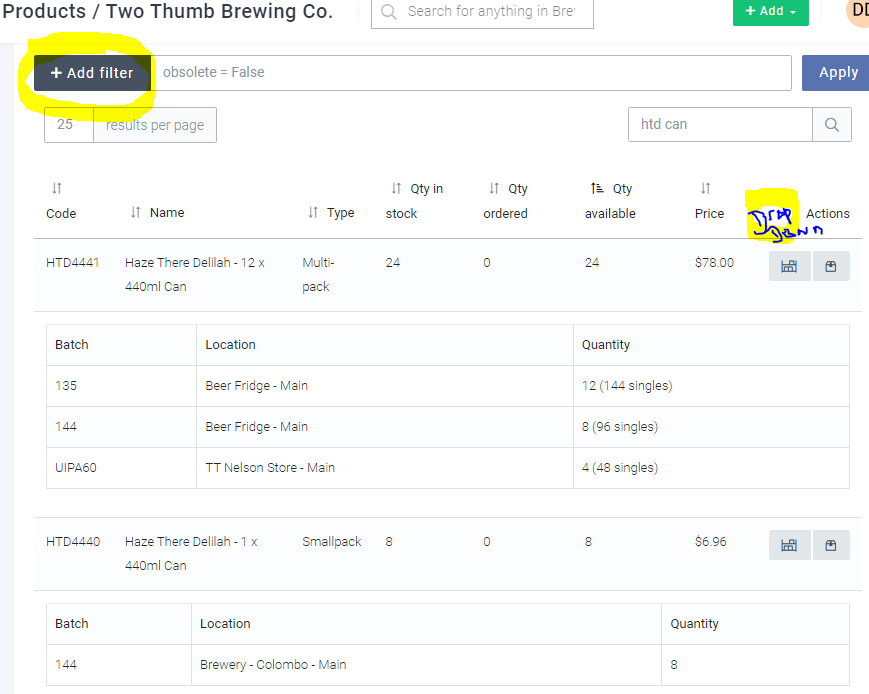
We’d like to be able to see stock and available on the Products page filtered by Location … currently stock at all locations is reported on the “Products” page but we want to be able to see what’s in stock/available from just one location. So either a Location Filter needs to be added to the “+ Add Filter” options, or a drop-down menu on the page to select the locations you want to see.
We are running into stock level issues where we are doing a quick check on stock for a product (eg cases of cans) and the screen says 50 in stock/available, but these are actually located with a distributor in the North Island so are not available for us to sell.
The attached screenshot shows that there is no stock of cases at the Brewery site once the “Toggle display of stock levels” button is hit, but in haste/speed people forget to hit that … and it’s a bit of a pain to have to do that for a whole list of products.
Thanks for the suggestion, @dave-dixon. I’ve merged it into an existing feature request for the same thing.
Sadly, this is far from a simple addition to the “Add filter” menu. I’m sure it will be possible to implement, but stock levels are not “stored” in the same way as normal fields, but calculated based upon actions and so adding them to this filter would be a very big task. (And currently all BrewwQL filtering only works on normal “stored” fields.)
If anyone else would like to see this, please make sure to vote for it and we can hopefully get this implemented
Thanks Luke … just so I get my head around it, in the screen shot I added you can see that the Locations button has been selected, and this shows the current current stock levels at each site. These qty numbers are calculated rather than stored on that page which makes sense, but they can be ‘interacted with’ to sort them on the page … so can’t we do the same with Location? As in, on the screen shot where I’ve indicated for a “Drop Down” menu option, is it possible to have the same type of heading as the rest of the columns? If so we could arrange by Location at least and then see all the stock from each site in groups. Could that work?
Thanks heaps for looking into this.
Dave
I’m afraid this idea won’t work either. We cannot add a “Location” column to the main table as each row represents a single product, and a single product can be in multiple locations concurrently. For your idea to work, we’d have to show the same product multiple times, and this isn’t the intention of this particular page (there are other reports that can give you this sort of information).
We can certainly look at allowing a filter of which sites/locations have their stock levels shown, but it’s not the “simple addition” that we’d have liked it to be.
So if I understand it correctly, the circled values are calculated, and not stored explicitly in a table. Is that right? If so, could you insert a filter function while making that calculation, to include/exclude sites as selected in a dropdown? Maybe just for “In stock” and “Qty available”, not for “Qty ordered”.
Just a thought… you’ve maybe considered this already.
Thanks,
Dave
Yes, that should be possible, but it’s just not the “simple addition” that it probably looks like on the surface (and therefore not a quick task to implement).
I think the filtering should apply to all three columns, rather than just two of them, as otherwise it will be confusing that the columns don’t “add up” (and to determine the “Qty available”, we need to calculate the “Qty ordered” anyway).