Hello Breww team,
We’d like to start using Breww as a CRM for our sales reps. However, we are finding the interface for logging visits quite cumbersome. It’s not very practical for our reps to go to the desktop site, find the customer, click view, and then New Sales Visit to get to the form, all while sitting in the driver’s seat on their phone preparing to go to their next stop.
Seems like there should be a quick shortcut to the form on the mobile app. Is that feasible?
1 Like
The expectation was the visits would be prepared in advance, rather than added ad-hoc while on the road. But we do want to support all use cases.
Yes, but the difficulty is that depending on who you asked, there would be hundreds of “quick shortcut” buttons (which would, of course, defeat the purpose). Possibly, the best solution is to allow people to customise their own quick shortcut buttons.
I guess I’d say our reps are a bit more spontaneous than that. They do typically start the day with a general plan, but as a rule, they would typically add and subtract from their route on the fly depending on their day is going with cancellations, re-bookings, meetings that run long, etc. By the end of the day, their actual route probably would never match very closely with what they’d planned out ahead of time. When they do make changes, I suspect they wouldn’t be thrilled to have to modify a planned sales route in Breww for each change they make.
As suggested, I guess custom shortcut buttons could be an option I suppose?
Although, that being said, we don’t necessarily need an app shortcut. We’d be happy with a quicker way to get to a visit log from the sidebar, and the ability to log a visit without having to plan it first.
Maybe a list option to access a visit log from the sales, leads, and customers pages?

you’d click on a button or menu item somewhere in the circled area, and it would take you to the visit form:
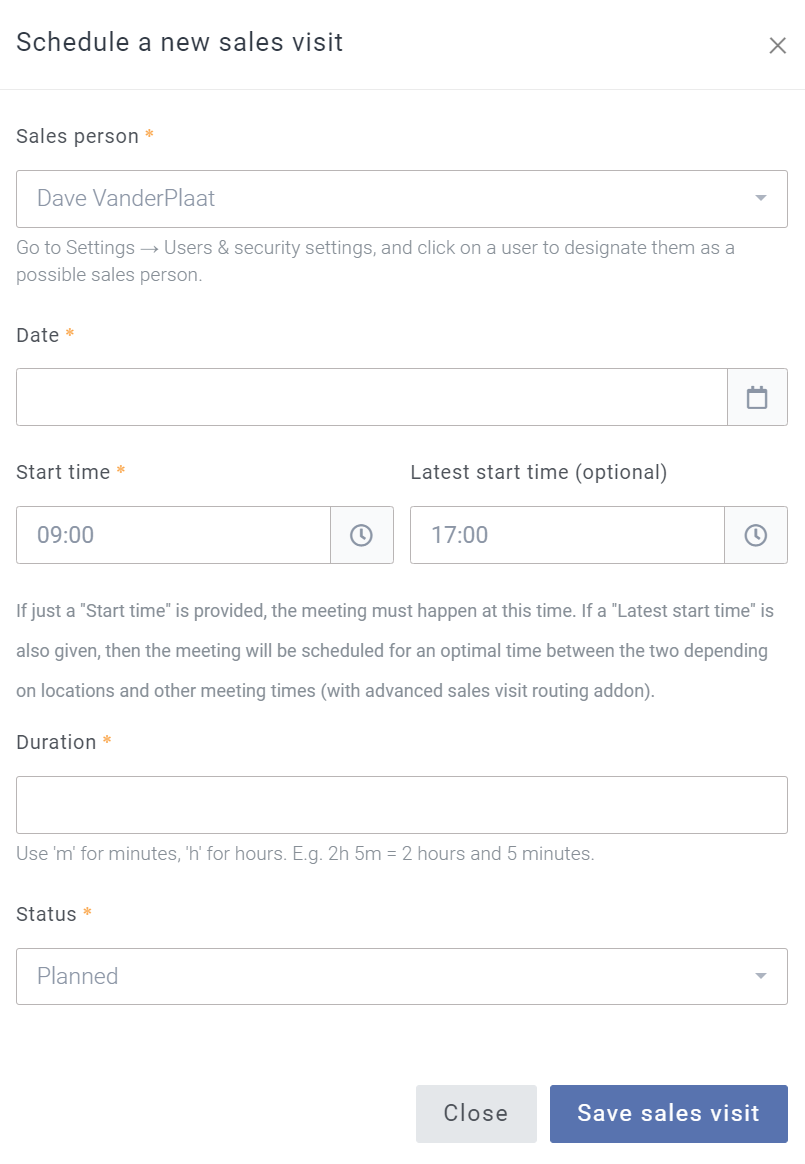
The visit form would have to have a dropdown containing all customers and leads, so that the user could specify what customer they visited right in the form. Even better would be if the user could select an actual contact person in this form, not just the customer.
(fyi, our reps also tend to use Breww mostly on their mobile device, not on a laptop, but I think they’re ok using the sidebar menus in the app).
Does this make sense to you?
Thanks,
Dave
Thanks Dave, yes, that does makes sense.
How about the process of:
- Search using the main header “Search for anything in Breww” search box
- Click on the lead/customer
- From the “New” drop-down choose “New sales visit”
This feels like a very similar process to your suggestion, but instead of starting with creating a sales visit and then choosing the customer, those two steps are reversed… and we don’t need to build anything new so you can do it today?
From the page in your screenshot (“Customers” main menu link), you can get to today’s sales visits by clicking “View” and then “Sales visits”.
Yep for sure. We haven’t really used the “search for anything” box much, but yes, totally, I can see how it’s useful for this. I think we can make the process work as described. Sorry, I hadn’t thought of that.
On another note, maybe this feature request is not the place for this question, but shouldn’t the “Record Activity” and “Record Sales Visit” functions be combined? It feels like you’d basically want one button to start the recording process for any type of communication or interaction with a customer. It seems weird to have to go to a different place in the software for a phone call or meeting, versus a visit. Is there a reason it’s set up this way, that I’m missing?
Also, if this belongs somewhere else let me know, but it seems like visits, emails, meetings, calls etc. should have the ability to have a contact name attached. It’s not enough for us to know we had a meeting at ABC Tavern… often, to be useful, we’d have to know who we met with as well.
Just some thoughts. I can put them in different FR’s if you like.
Thanks for your help
Dave
1 Like
The difference is one is intended to schedule a visit in advance of the meeting and the other is to log activities of any type retrospectively.
Yes, please. We need feature requests to be clear so people know what they’re voting for and we know what everyone voting wants us to build. Single requests that span a number of similar or related ideas don’t work very well, to be honest.
Ok - no problem, makes sense. I’ll do that…
Dave
1 Like