Is there a filter or a way to hide a certain customer type from appearing on the list? There is a parent company set up but it will eventually contain the names of hundreds of people and I’d like them not to appear in the customer list.
Hi Angeline, Thanks for your comment, and welcome to the community! Yes, if you are creating a customer list in Breww, you will be able to filter your list so that a specific customer type is not included by using the BrewwQL filter. You will be able to use the following for this:
type != “Enter customer type here”
If you have a ‘Parent company’ that you would like excluded from a customer list, you could use:
parent_company.name != “Enter parent company here”
Thank you,
Is there a way to make the filter permanent?
Hi Angeline, thanks for your reply. It isn’t currently possible to set this list as the permanent ‘Default’ when landing on the ‘customers’ page; however, once you have created the customer list, you will be able to save it so you can quickly access it in the future. If you are creating this from the main ‘Customers’ page, there is a green Save button on the right of the page. This will then allow you to select this customer list from the drop-down list next to where it says Customers; alternatively, you can view the list by selecting View → Customer lists.
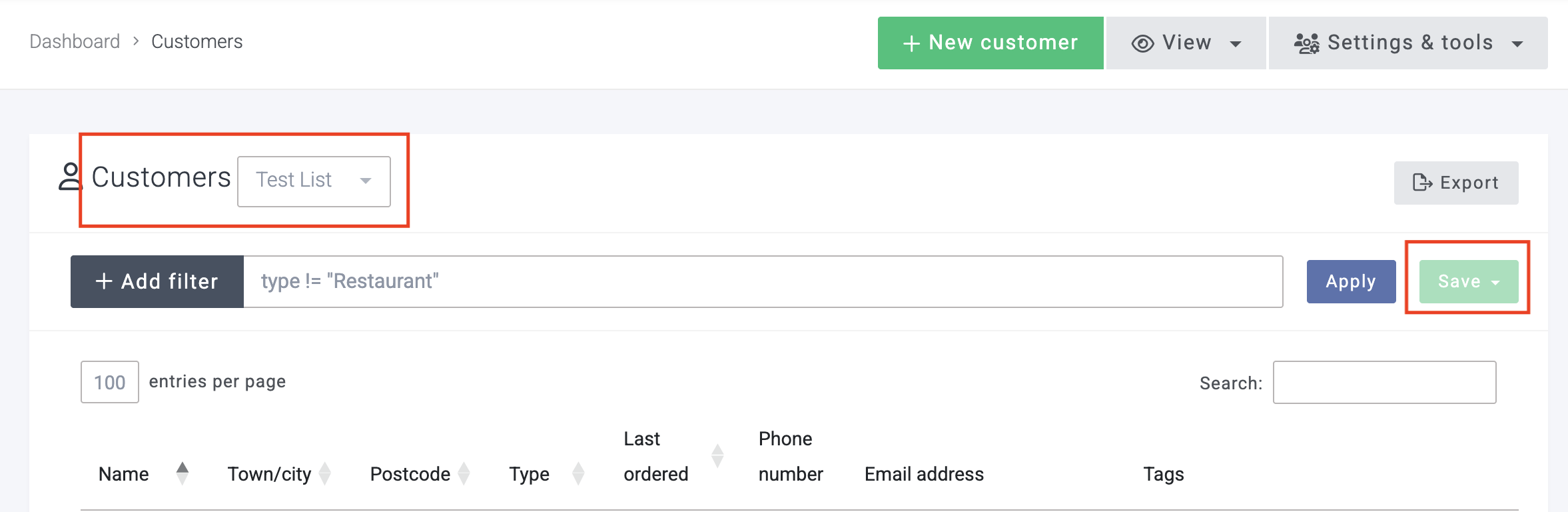
There is a feature request for setting a default customer list on the ‘Customers’ page here: Choose your own default customer list on the ‘Customers’ page . It would be great if you could add your vote to this! Let me know if you need anything else. Cheers!