Hello.
I can’t remember or figure out how to print stock labels for alias beers.
We have converted the original stock into the alias stock but can’t figure out how to print the new labels so we can physically relabel the stock.
Is this possible?
Thanks,
Lewis.
I’m afraid it’s not possible to print labels for ‘alias’ beers. Do you mean ‘derived’ beers?
Alias beers, in Breww, are intended not to be separated from their parent stock until the point of order and delivery, where you could stick the delivery label over the parent product’s racking label. This means you cannot print stock labels for alias beers as they share the stock with the parent.
Derived beers, however; you can print labels for these from the ‘Stock breakdown’ tab on the product’s page.
My bad, I meant derived indeed. Found the labels now. Thanks
Looking at the original post for Alias and Derived beers, the purpose of an alias beer was so that the end consumer didn’t know that the beers were the same product inside the packaging.
An alias beer in Breww is when you have a standard beer that is sold under 2 (or more) brand names, but the beer itself is identical, and you’re happy for the stock of both brands of beer to be one combined number. You can then sell both brands, as different names (and even with different ABVs) and your customers have no idea that these two “beers” are the same."
In order for us to be able to sell the same beer, to multiple customers, as different brands, and perhaps differing ABVs, we need our keg and packaging labels to reflect the beer that has been sold to them, i.e. matching the alias name on the invoice. As a customer, I would be immediately concerned if the label on the keg didn’t match the beer on an invoice. For export customers, this would be worse, and would be flagged by customs.
Are we able to have the functionality to print packaging labels with an alias name added? Even if done after racking?
Hi Ben, thanks for your comments here. You’re right; currently, if you have racked a single stock pool of a primary beer, you won’t be able to print a stock label of the Alias beer; however, you will be able to print a delivery label to use on the container instead. The process here would be that you wouldn’t display the stock label on the keg but instead use the delivery label, which includes the alias beer name, which will therefore, match the invoice.
You could choose to create a derived beer instead of an alias, where you will be able to still rack the entirety of the batch as the primary beer, as you do with an Alias. You could then use the ‘Convert stock between related beers’ tool on the primary product to convert the required stock into the derived beer. This would mean that you can print a stock label for the derived beer after racking the primary beer. Let me know if you have any more questions. Cheers!
Is it possible to print out stock labels for alias beers using custom label templates?
We’re currently selling our own beer to another brewery who is then putting their name on it. We want the number of stock to be the same on our system but we want to be able to put their name on the product label at the point of racking.
This would make loading the van a more efficient process rather than printing new labels for specific containers (especially if they’re non-returnable containers) every time we send the beer out.
Hi Gruff, Thanks for your comment. If you have an alias beer product set up in your Breww account, you can choose to print a stock label for this via the print button on either the product stock breakdown, the Actions tab on a batch, or from a planned packaging. I have included an example of this below, where it gives the choice to print as the base beer or as an alias; this will automatically default to the base product, but can be changed here. Cheers!
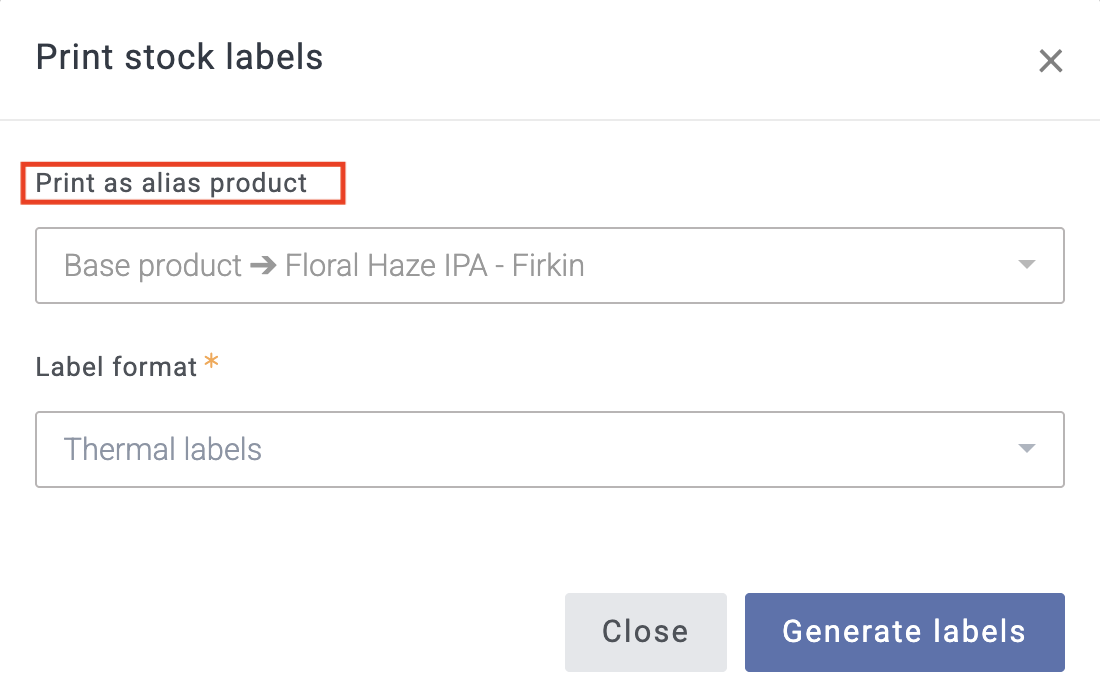
Hi Ben, I do know about this function. The problem is that we can’t set a custom label template for alias beers.
Hi Gruff, Thanks for your reply. Ah apologies! Unfortunately, custom stock label templates cannot currently be set on alias products, as you have suggested; instead, the ‘alias’ product will use the template set on the base product or container type. If you would like to see this added as a feature in Breww, it would be great if you could add this suggestion as a feature request. Let me know if you need anything else! Cheers.