Batch readings have had a big update. Readings are now recorded against the vessel they were taken in, and a set of rules decides which readings each vessel needs and how often, so a fermenter in full fermentation and a cask/barrel that has been conditioning for months no longer share one brewery-wide daily reminder.
Here’s what’s new:
-
Readings are recorded per vessel. Choose the vessel as you record a reading, or record it against the whole batch. Split batches finally get readings that line up with the tank they came from. Read more about recording batch readings.
-
Named batch reading forms. Build as many forms as you need, each with its own readings and its own rules about which are compulsory, so a quick daily gravity and temperature check and a full lab panel can be separate. Read more about batch reading forms.
-
Schedule rules decide what each vessel needs. Using the same rules editor as your delivery and best before rules, determine which readings to take from the vessel type, vessel group, vessel status, site, days since the vessel was filled or the batch started, the drink, its style or its tags, and the day of the week. Each answer sets a reading form, a frequency (every X days, weekly on days you choose, or monthly) and how many readings are needed each time. You can switch readings off entirely for vessels that don’t need them. Read more about batch reading schedule rules.
-
A Batch readings tab on the production dashboard. A tile for every filled vessel shows the batch in it, the form it’s scheduled to use, a mark for each reading done or still outstanding, and a Due, Overdue, Done, Not due or Off badge. Record a reading straight from the tile and the right form opens. Read more about the production dashboard.
-
Twelve more readings built in. ABV, apparent extract, real extract, residual sugar, free SO₂, total SO₂, malic acid, lactic acid, volatile acidity, YAN, cell viability and total package oxygen, along with new units including Baumé (°Bé), Oechsle (°Oe), Lovibond (°L), kPa, g/ml and ppm. Plenty here for cider and wine producers as well as lab-heavy breweries.
-
Add your own readings. If Breww still doesn’t have what you measure, create your own numeric reading. Pick the kind of measurement so Breww knows which units to offer and what range to accept, or choose Other and enter your own unit label and decimal places.
-
Final batch ABV. Mark an ABV reading as the batch’s final ABV, the same way you already mark an original or final gravity. There’s a new duty option to match, Final ABV entered as a batch reading, so breweries that measure the finished strength can use that figure for duty rather than one worked out from gravity. Read more about final batch ABV.
-
New charts, and comparisons on any reading. The Analysis tab gains an ABV chart, showing the ABV calculated from gravity alongside any ABV readings you’ve entered and a star for the final ABV, plus an Other readings chart with a picker for everything else recorded on the batch. Batch comparisons and batch comparison dashboards can chart any numeric reading, custom ones included. Read more about batch comparison dashboards.
Nothing to set up, and nothing lost. Your existing settings have come across for you. The readings you had shown, and which of them you had made required, are now a batch reading form called Daily readings, set as your default. Your old daily batch readings count is now a schedule of the same name, asking for that many readings a day for every vessel. If you had it set to 0, readings stay switched off. Everything carries on exactly as it did until you decide to add conditions and split your vessels onto different schedules.
This one closes several long-standing community requests, so thank you to everyone who asked for it and voted.
Learn more about batch reading forms and batch reading schedule rules in Breww.
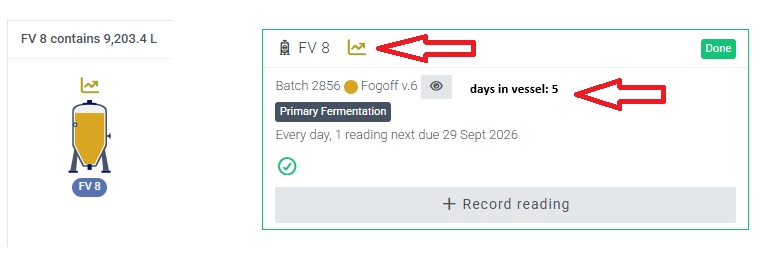
 A vessel’s required batch readings can now be recorded separately, at different times and by different people, and still complete its reading schedule.